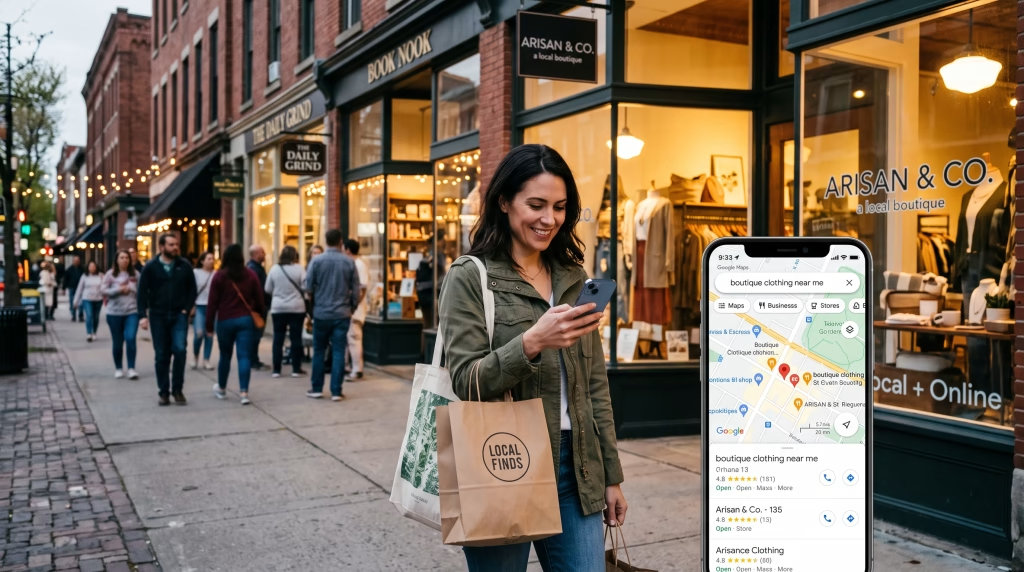
Since November 2025, Google has been able to pick up the phone for a shopper. Search for certain products near you in the U.S. (toys, health and beauty, electronics) and Google may offer to call nearby stores, ask whether the item is in stock, what it costs and whether there’s a promotion, then send back a summary. In April 2026 Google announced it was bringing the same feature to AI Mode. It’s a small feature with a big implication for anyone who sells online: “who has this near me, right now?” is increasingly answered by software, and that software works with whatever information your store has made available.
That’s the job of local SEO for eCommerce. It isn’t the same work as local SEO for a plumber, and it isn’t the same as ranking product pages nationally. It sits between the two: getting your products, not just your business name, in front of people close enough to pick them up today, or close enough that “ships from McAllen” means it arrives tomorrow. I build and audit online stores from McAllen, including a luxury watch store whose biggest sales close in a New York showroom. Below: how the local side works for three different kinds of store, what changed in 2025 and 2026, and what’s specific to selling in a border market like the Rio Grande Valley.
Table of Contents
- What is local SEO for eCommerce?
- First, figure out which kind of store you are
- Why the local side of eCommerce matters more in 2026
- The playbook for stores customers can visit
- The hybrid store: when the website sells and a showroom closes
- Local SEO for online-only stores
- The RGV angle: a local market that crosses the river
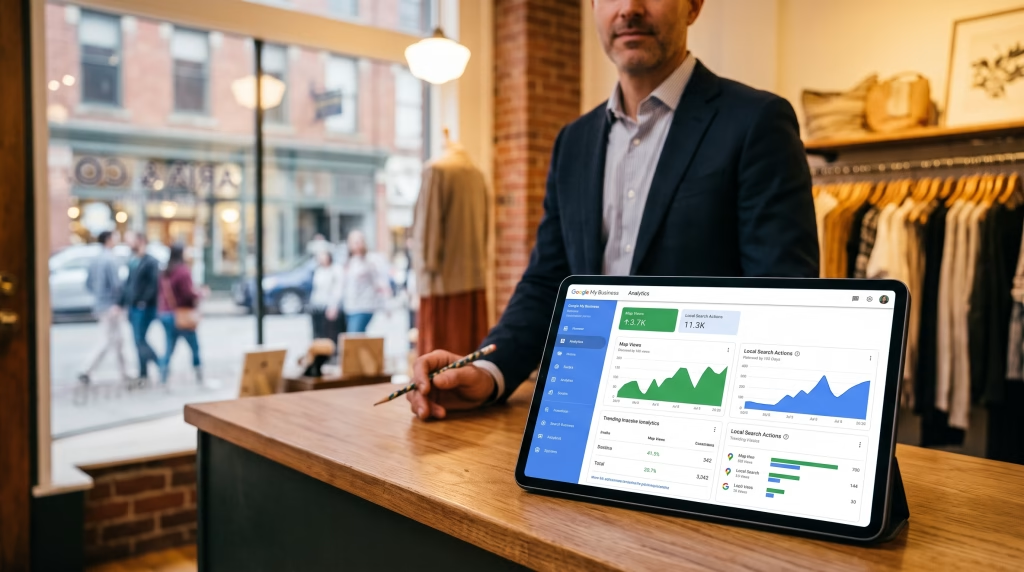
- How to measure local SEO for an online store
- Common local SEO mistakes online stores make
- Quick FAQ
- Want to know what your store is missing locally?
What is local SEO for eCommerce?
Local SEO for eCommerce is the work of making an online store’s products and locations visible to shoppers searching nearby. For stores with a physical location, that means a complete Google Business Profile, in-store inventory on Google, store pickup and a real page for each location. For online-only stores, it means regional delivery, local relevance and local links, without faking an address.
First, figure out which kind of store you are
Everything else depends on this, because Google’s rules are different for each type.
Google Business Profile, the listing behind the map results, has one core requirement: “a business must make in-person contact with customers during its stated hours.” Google’s guidelines explicitly exclude brands and other online-only businesses, and they exclude addresses that are a P.O. box or a remote mailbox (Google Business Profile eligibility guidelines).
| Store with a storefront | Online store with a showroom or pickup counter | Online-only store | |
|---|---|---|---|
| What it looks like | A shop customers walk into that also sells online | Sells mostly online; customers can pick up or visit by appointment | Ships from a warehouse or home; no customer-facing location |
| Google Business Profile | Yes | Yes, if customers meet staff there during the hours you list | No |
| In-store inventory on Google | Yes | Yes, for products you keep on site | No |
| Main local lever | Local inventory, profile, store reviews | Pickup, appointments, profile | Delivery area, local relevance, local links |
If you’re the third type, don’t solve it with a virtual office or a relative’s address. It breaks the guidelines, and suspended profiles disappear from Maps, reviews included. If you later add a real, staffed pickup counter, you move into the second column. For some online stores, the local visibility alone justifies opening one.
Why the local side of eCommerce matters more in 2026
Three changes, each with a source:
- AI is doing the local legwork. Google’s Shopping Graph holds more than 50 billion product listings, and about 2 billion of them are refreshed every hour. AI Mode draws on it for price, review and inventory details. “Let Google Call” phones nearby stores about stock and price in the U.S. It launched in Search in November 2025, and in April 2026 Google announced it was coming to AI Mode (Google, Nov 13, 2025; TechCrunch, Apr 17, 2026). In BrightLocal’s 2026 consumer survey, 45% of consumers said they use ChatGPT or other AI tools to find local businesses, up from 6% a year earlier (BrightLocal, Feb 2026).
- For local questions, AI answers lean on Business Profiles. BrightLocal analyzed nearly 2 million citations for 1,355 business locations in the U.S., U.K. and Australia. Google Business Profile accounted for about 67% of the citations in Google’s AI Overviews and about 53% in AI Mode. In ChatGPT, Yelp was clearly the most-cited source (BrightLocal, Aug 26, 2026). A store with no profile and no Yelp page barely exists for that layer of search.
- Shoppers want proof it’s on the shelf, and they’ve been burned before. In a YouGov survey of 1,035 U.S. adults who had recently shopped in fashion, general-merchandise or specialty stores, 78% had tried to buy something in-store in the past 90 days that was sold out or limited, and 57% had found items listed as available online that were out of stock at the store. Only 21% check stock on a retailer’s site or app before heading out. The survey was commissioned by GreyOrange, a company that sells retail fulfillment technology, and ran in June 2026 (GreyOrange, Sept 8, 2026).
The opportunity for a small store is in that last point. Accurate stock information is rarer than it should be. A product page that says “3 in stock at our McAllen store” and is right earns the trip, and it’s the kind of data Google can read and repeat.
The playbook for stores customers can visit
1. Treat your Google Business Profile like a storefront
Most online stores that have a profile set it up once and forgot it. For a retailer it does more than show hours. It’s where shoppers see whether you have the thing and whether they can get it today.
- Primary category: the most specific one that’s true, like “Record store,” “Jewelry store” or “Women’s clothing store.” It should describe the place a customer walks into, not the fact that you also sell online.
- Service options: mark in-store shopping, in-store pickup, curbside pickup and same-day delivery only if you really offer them. They appear on the profile and answer “can I get it today?” before anyone calls.
- Hours, including holiday hours. A shopper who drives over on a holiday and finds you closed leaves a review about it.
- Website link: point it to the location’s page on your site (with UTM tags so you can track it), not the homepage.
- Products: Google now routes Business Profile product management through Merchant Center, so you need Merchant Center access to manage the products on your profile (Google Business Profile Help). Linking the two accounts is what puts your catalog on your profile and in Maps.
- Photos of the real store and real stock, not manufacturer images.
- The phone: someone who can check stock should answer during posted hours. If Google’s AI calls and nobody picks up, the summary the shopper gets will be built from the stores that did answer.
2. Put your in-store inventory on Google, for free
Google Merchant Center has a free program, free local listings, that shows the products you sell in-store across Google. It’s available in 48 countries, including the U.S. and Mexico. The paid version, local inventory ads, runs in more than 70 (Google Merchant Center Help).
To use it, link Merchant Center to your Business Profile and give Google your in-store inventory. Merchant Center offers several ways to do that:
- Automatic collection from your online store. Google reads in-store availability from your product pages. Those pages have to actually show in-store availability, and you can’t block Googlebot or Google StoreBot. Coverage depends on how much of your site Google crawls each day.
- A daily inventory file, uploaded or fetched from a URL. Google recommends refreshing local inventory every day.
- The Merchant API or an approved inventory data provider, usually the route for stores whose point-of-sale system can sync stock.
Two pickup labels are worth knowing. Pickup today means a product can be bought or reserved online and picked up the same or next day. Pickup later covers products that aren’t on the shelf yet but can be picked up within a set time frame.
One warning: the data has to match the shelf. The 57% figure above is what happens when it doesn’t, and a wrong “in stock” costs you the customer and the review.
3. Make the product page say what the shelf says
Since Google can collect in-store availability from your product pages, the page has to say it plainly, where a human sees it too:
- Show store availability next to the price and the Add to Cart button: “In stock at our McAllen store,” “Pick up today if you order by 4 p.m.”
- Offer local pickup at checkout. In WooCommerce, the Local Pickup option in the Checkout block supports several pickup locations, each with its own address and instructions, and calculates tax based on the pickup location (WooCommerce docs). Shopify has local pickup in its shipping settings too.
- Complete Product structured data with price and availability on every product page. Missing fields are one of the most common problems we find in eCommerce SEO audits.
- Tell Google your shipping and return policies once, for the whole site. Since November 2025, Google accepts site-wide shipping policy markup nested under
Organization, and it lets online merchants set shipping and returns directly in Search Console. If both exist, the Search Console settings win.
4. Give every location one real page
Not a contact page with a map embedded in it. A page that could only be about this location:
- Full address, hours (holiday hours included), phone number, map, and notes on parking or which entrance to use.
- What’s stocked at this location versus online only, plus pickup instructions: where the counter is and what to bring.
- Photos of the place and the people, and which languages the staff speak.
Storestructured data (a type ofLocalBusiness) with details that match the Business Profile exactly.- The same name, address and phone number on Google, Apple Business Connect, Bing Places and Yelp. Yelp matters more than most stores assume, because it’s ChatGPT’s most-cited local source.
This is the page your Business Profile should link to. With several locations, each one gets its own. We cover the multi-location side in how to master SEO for franchises.
5. Collect two kinds of reviews
Online stores usually have product reviews, the stars on a product page, and no store reviews, the ones on the Business Profile. They do different jobs. Product reviews help that product sell. Store reviews help the location show up in the map pack and in AI answers.
Pickup is the best moment to ask for a store review. The customer is standing in your store and has just had the in-person experience the review is about. A QR code at the counter and a follow-up message with a direct link to your Google review form will do more than any email sequence.
Two rules apply. Google prohibits asking only happy customers for reviews and offering anything in return for one (Google Maps content policy). The FTC’s rule on fake reviews, in effect since October 21, 2024, lets the agency seek civil penalties for fake reviews or for suppressing negative ones (FTC).
The hybrid store: when the website sells and a showroom closes
Watch My Diamonds, a store we built, sells pre-owned Rolex, Patek Philippe and Audemars Piguet watches from a showroom in New York’s Diamond District. At that price, many buyers want to see the watch before they wire the money, so the site treats the showroom as the place where the sale closes. Every listing opens with case size, condition and box-and-papers status, and a Schedule an Appointment / Call Us pair stays on screen on every page.
That design choice is also the local SEO strategy. The appointment flow is what connects a national online catalog to a place Google can put on a map. The same lessons apply to any hybrid store, even one selling $40 items:
- Make the in-person option visible on every product page, not buried in the footer.
- Add your booking or appointment link to your Business Profile.
- Track appointments and calls from the profile separately from web orders. Otherwise the showroom’s share of revenue never gets credited to search.
Local SEO for online-only stores
No profile, no pin on the map. You still have four ways to compete for nearby buyers.
Make delivery speed your local advantage
If you can deliver same-day or next-day in your area, say exactly where and how: which cities or ZIP codes, the order cutoff time and the cost. Put it on one well-built delivery page and on every product page. Then set up your shipping in Merchant Center or Search Console so Google can show delivery cost and speed in its results. “Delivered tomorrow in McAllen” is a local advantage the national chains can’t always match.
Don’t build a page for every city
Twenty pages called “Buy Vinyl Records in Edinburg,” “…in Mission,” “…in Pharr,” with only the city name changed, are the classic mistake. Google’s spam policies list pages aimed at different cities that all funnel visitors to the same place as an example of doorway abuse (Google Search spam policies). A city page earns its place only when something about that city is actually different: a delivery schedule, a pickup partner, a local product line.
Write category pages in the words local shoppers use
In the Valley, that often means Spanish, and not a machine-translated version of the English page. The same product can have a different everyday name on each side of the river, and Spanish-speaking shoppers use different search terms than a literal translation would suggest. Category copy written in the terms your buyers actually type does more for local reach than any city page.
Earn local links and mentions
Local press, the chamber of commerce, sponsoring a school or league event, working with local creators, and wholesale or consignment deals with local shops. The last one has a bonus: if your product is on a local store’s shelf and that store sends its inventory to Google, your product can show up in local results through its listing. These are also the mentions AI assistants read when they decide which brands to recommend.
The RGV angle: a local market that crosses the river
Selling locally in the Rio Grande Valley isn’t only about Valley residents.
- McAllen collected a record $99.9 million in sales tax in 2025 on about $5 billion in taxable sales. The City estimates that Mexican shoppers drive up to 30% of the local economy, and describes December as a signature shopping season for international visitors (City of McAllen, Feb 17, 2026).
- In Hidalgo County, 80.1% of residents age 5 and older speak a language other than English at home (U.S. Census Bureau QuickFacts, ACS 2020–2024).
What that means for a store’s local SEO:
- Your nearby customer may be searching from Reynosa or Monterrey, in Spanish, days before the trip. Spanish product and location pages, written the way Mexican shoppers phrase things and paired with the English versions through hreflang, are how you get found before they cross.
- Pickup is the bridge across the border. Order online from Mexico, pick up in McAllen: no international shipping, and the item is set aside before the drive. Say it plainly in Spanish on the product page and at checkout: Compra en línea y recoge en nuestra tienda de McAllen.
- Answer the practical questions up front. Mark prices clearly in U.S. dollars, list which cards and payment methods you accept, and say whether you ship to Mexico or only offer pickup.
- Get ready before the peaks. Update holiday hours, stock data and Business Profile posts ahead of December and the other holiday periods when visitors from Mexico come to shop. Answer Spanish reviews in Spanish.
How to measure local SEO for an online store
| What to track | Where to find it | What it tells you |
|---|---|---|
| Calls, direction requests, website clicks | Business Profile performance | Whether the profile is sending people to you |
| Clicks and impressions from your listings | Merchant Center performance reports | Whether your products show up in Google’s shopping results |
| Orders that use local pickup | Store admin, or GA4 by shipping method | How much online revenue the location is producing |
| Searches with city names or “near me” | Search Console, Performance report (query filter) | Whether local-intent searches find your pages |
| Visits from the profile | GA4, using the UTM-tagged website link | What profile visitors do on the site |
| AI mentions | A monthly check in AI Mode, ChatGPT and Gemini: “where can I buy [product] in McAllen?” | Whether AI assistants name your store |
For the local ranking side, our list of free local SEO tools covers the trackers that don’t need a subscription. How AI answers are changing local search traffic is in AI Overviews Just Got Bigger.
Common local SEO mistakes online stores make
- A Business Profile at a virtual office or a borrowed address for a store customers can’t visit.
- A page for every city with only the city name changed.
- “In stock” online, sold out on the shelf.
- A profile website link that goes to the homepage instead of the location page.
- English-only product pages in a county where 80% of residents speak another language at home.
- Asking for product reviews but never store reviews.
- Nobody answering the store phone during posted hours. For some product categories, the caller may now be Google.
Quick FAQ
Can an online-only store do local SEO?
Yes, but not through Google Business Profile, which requires in-person contact with customers during posted hours. Online-only stores compete locally with clearly stated fast delivery on the site and in Merchant Center, category pages written in the words local shoppers use, and links and mentions from local media and organizations.
Does my online store need a Google Business Profile?
Only if customers can visit a staffed location: a storefront, a showroom or a pickup counter. If they can, the profile is the most visible local asset you have. If they can’t, don’t create one at a virtual office or a borrowed address. It breaks Google’s guidelines and puts the profile at risk of suspension.
How do I get in-store stock and “pickup today” to show on Google?
Link Google Merchant Center to your Business Profile and send it your in-store inventory. Google can read it from product pages that show store availability, or you can upload a daily inventory file or connect through an approved data provider. Free local listings are available in the U.S. and Mexico.
Should I create a page for every city I ship to?
Only when something about that city is genuinely different, such as a delivery schedule, a pickup point or a local product range. Pages that only swap the city name are what Google’s spam policies call doorway pages. One strong delivery-area page usually beats twenty thin ones.
How long does local SEO take for an eCommerce store?
Profile fixes, service options and new store reviews can show up in map results within weeks. In-store inventory appears once Merchant Center accepts your store and inventory data. Category and location pages usually take three to six months to rank in regular search results, depending on the competition.
Want to know what your store is missing locally?
RGV Web is a web design and SEO practice based in McAllen, TX. Send us your store’s URL and we’ll send back a free store teardown: a written look at your Business Profile, product pages, local inventory setup and Spanish-language presence, and which fix to make first. See how our eCommerce SEO works, start the conversation here, or call (956) 991-6596.
Ready to Dominate Local Search in the RGV?
We build high-performance websites with built-in semantic structure and local entity schemas. Let's make your business the authority in South Texas.

Written by Carlos Guzmán
Carlos Guzmán is the founder of RGV Web — a web designer and SEO specialist with 20+ years of experience helping small businesses in Mexico and the U.S. turn their websites into real business assets, from design and development to SEO, automation, and e-commerce.