On November 10, 2026, OpenAI opened a beta called Businesses in ChatGPT. For the first time, a business owner can claim their business inside ChatGPT, correct the details it shows, and see how often ChatGPT mentions the business and sends people to its website. OpenAI says ChatGPT is used by 1.2 billion people a week (OpenAI, Nov 10, 2026).
If you run a business in the Rio Grande Valley, this will feel familiar. It works a lot like the Google Business Profile you probably set up years ago: find your listing, prove it’s yours, fix what’s wrong. But the fine print matters more than the headline. Most local businesses in McAllen, Edinburg or Harlingen can do less with it today than the launch coverage suggests, and some of the most common claims you’ll hear about it (“claim it and ChatGPT will recommend you more”) are things OpenAI explicitly says it doesn’t do. Below: what it is, who can use it right now, how to claim yours, how to read the numbers, and the order I’d do things in.
Table of Contents
- What Is ChatGPT’s Business Hub?
- The Three Parts of Businesses in ChatGPT
- Who Can Claim Today, and Where Most RGV Businesses Fall
- How to Claim Your Business in ChatGPT, Step by Step
- What the Numbers in Business Hub Actually Mean
- What Claiming Your Business Won’t Do
- Business Agents: Worth It for an RGV Business?
- What I’d Do This Week If I Owned an RGV Business
- Quick FAQ
- Want Help Getting Your Business Right in ChatGPT?
What Is ChatGPT’s Business Hub?
Business Hub is OpenAI’s dashboard for businesses in ChatGPT, launched in beta on November 10, 2026. Owners can claim their business, verify it, edit details like their website, description and category, and see 28 days of insights: how often ChatGPT mentions the business, how many people click through to the website, and the topics where it appears.
The Three Parts of Businesses in ChatGPT
OpenAI launched three things at once. They have different rules, so it helps to keep them apart.
- Claiming your business. You find your business in Business Hub, prove you’re allowed to manage it, and then update key details. Stores that sell products can also connect a product feed with prices and availability. You don’t need a ChatGPT ads account or an enterprise contract to do this (OpenAI Help Center).
- Insights. Aggregated numbers about how people engage with your business in ChatGPT: mentions, profile views, website clicks and “discovery topics.” More on what each one means below.
- Business Agents. A chat assistant, built from information you provide, that customers can talk to from your ChatGPT profile. At launch these are only for eligible ecommerce and online service businesses in the U.S.
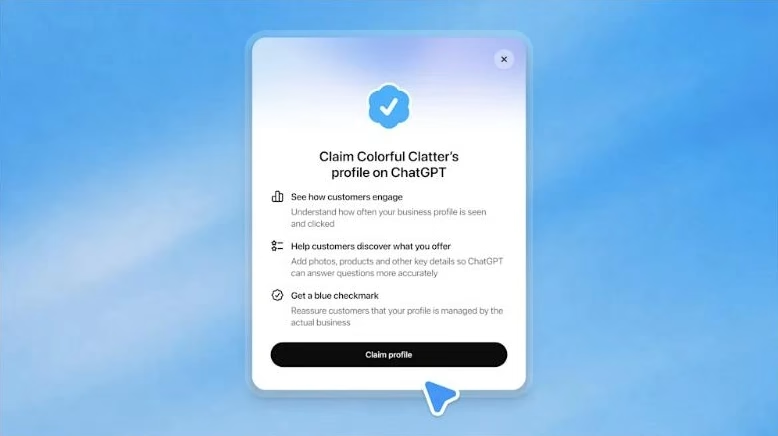
When ChatGPT mentions a business in an answer, people can open that business’s profile in ChatGPT, see its details, visit the website, and start a chat with its Business Agent if it has one. That profile is what you’re claiming.
Who Can Claim Today, and Where Most RGV Businesses Fall
This is the part most coverage skips. OpenAI’s help doc says availability depends on where the business is and what kind of business it is (OpenAI Help Center). Here’s how that lands for the kinds of businesses we work with in the Valley:
| Type of business | Claim a profile? | Insights? | Business Agent? |
|---|---|---|---|
| Local store or restaurant (a boutique on Main Street, a taquería in Pharr) | Only an existing U.S. listing. You can’t add one yet | After the ID check | Not for in-person-only businesses |
| Online store (Shopify, WooCommerce) | Yes, or add one if none exists | After the ID check | Yes, if U.S.-based and the category qualifies |
| Online service business | Yes | After the ID check | Yes, if U.S.-based and the category qualifies |
| Service-area business (plumber, A/C, roofer) | Not stated by OpenAI. Search for your listing | If you can claim | Not stated |
| Business in Mexico (Reynosa, Matamoros) | Maybe, where ChatGPT and its verification methods work. Local stores and restaurants need a U.S. listing | If you can claim | No, U.S. only |
Two things stand out for the RGV. First, a brick-and-mortar business can’t create its own listing yet. If ChatGPT doesn’t already know about you, there’s nothing to claim, which makes your website and your other listings more important, not less. Second, the Business Agent, the feature with the most buzz, isn’t available to local stores, restaurants or most service companies at all right now. OpenAI says it plans to expand to more markets and business categories over time, but it hasn’t said when.
How to Claim Your Business in ChatGPT, Step by Step
According to OpenAI’s help doc, the process has two stages: claim the business, then verify who you are.
- Sign in to ChatGPT and open Business Hub from the sidebar (or go to chatgpt.com/business-hub). Use the ChatGPT account you want to manage the business with. You can add teammates later.
- Search for your business by name and pick the listing that matches. If you can’t find it and you run an online business, you may get an option to add it. A local store or restaurant can only claim an existing U.S. listing.
- Verify the claim with one of the methods offered: a code by text or automated call to the business phone, a code to the business email, a TXT record added to your website’s domain settings (DNS), or by connecting a Shopify store. If someone else manages your domain, they’ll have to add the record for you.
- Wait for approval. OpenAI reviews the claim and emails you a decision or a request for more information.
- Complete identity verification through Persona, the identity-check service OpenAI uses. Until this is approved you can’t publish changes, connect a product feed, see insights or build an agent. Claiming alone doesn’t give your profile the blue verified badge; that comes after Persona approves you.
For the Persona step, expect to be asked for a government-issued ID, business registration information and proof that you’re authorized to represent the business. OpenAI says the business name, address and any registration or tax number you submit should match your official records. Before you start, have the documents for how your business is legally registered ready, and make sure the name and address on them match your website and your Google Business Profile. Mismatches are what slow down verification on every platform.
Three details from the help doc are worth knowing before you click anything:
- A published profile can’t be deleted or hidden by OpenAI support. Only unpublished drafts can be deleted. Check the details before you submit.
- If someone else already claimed your business, there’s a “Dispute ownership” option in the profile’s menu, verified through Persona. It’s the same problem we see when a former employee or web designer still controls a business’s Google profile, so it’s worth checking early.
- You can give an agency access. The person who claimed the business can add teammates and grant an agency access to manage the business or its agent, each with their own ChatGPT account. Don’t share your login, and don’t forward your claim invitation.
What the Numbers in Business Hub Actually Mean
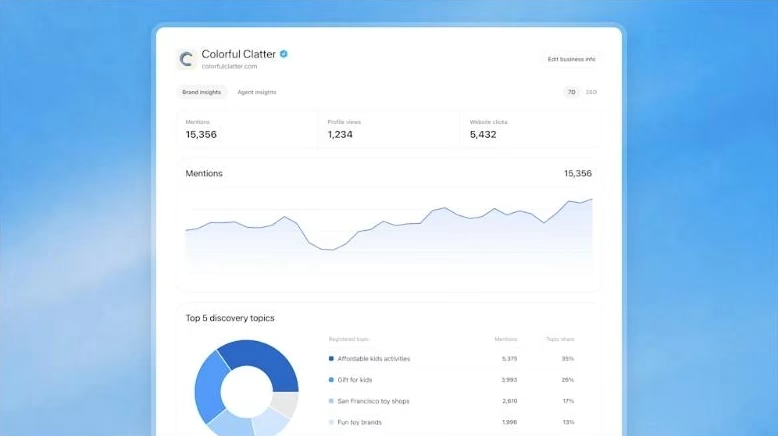
Insights cover the past 28 days. OpenAI’s help doc defines each metric, and the definitions are different for local and online businesses:
- Mentions. For an online business, a mention only counts when ChatGPT references the business’s website; saying the brand name alone doesn’t count. For a local business, a mention counts whenever ChatGPT shows a result for that location, even if the person never opens the listing or visits the website. So a local business’s mentions will usually look much bigger than its clicks. That isn’t a problem; it’s how the metric is built.
- Website clicks. How often people click through from ChatGPT to your site.
- Discovery topics. Common themes in the ChatGPT answers that mentioned or cited your business. These are grouped themes, not the questions people actually typed.
What you won’t see: individual prompts, customer conversations, or chats with your Business Agent. OpenAI only shows aggregates, and only once there’s enough activity to meet a reporting threshold. That last part matters for a small business in the Valley. A blank chart doesn’t necessarily mean zero. The help doc says a blank metric can mean you haven’t reached the threshold yet, the data is still being collected, or reporting isn’t available.
Business Hub also doesn’t replace the tools you already have. Here’s where each kind of AI traffic shows up today:
| Where people found you | Where to see it |
|---|---|
| ChatGPT mentions and clicks | Business Hub (new) |
| ChatGPT visits landing on your site | Google Analytics 4, under the source chatgpt.com. ChatGPT tags the links it sends, apart from a tracking bug in October (Search Engine Journal, Oct 15, 2026) |
| Google AI Overviews and AI Mode | Google Search Console, which reports them as part of Search (more on that here) |
If your Business Hub clicks and your GA4 ChatGPT sessions don’t match exactly, that’s normal. They’re counted by different systems. Watch whether both move in the same direction over a few months.
What Claiming Your Business Won’t Do
OpenAI is unusually direct about this in its own help doc, and it’s worth repeating before anyone sells you a “ChatGPT ranking” package:
- Claiming doesn’t make ChatGPT recommend you more. In OpenAI’s words, it “doesn’t guarantee increased visibility,” and it doesn’t give you control over ChatGPT’s independent recommendations.
- Advertising doesn’t buy you a place in the answers. OpenAI says ads don’t influence ChatGPT’s independent answers. Sponsored placements are labeled separately.
- ChatGPT still uses other sources. Changes you make are reviewed before they’re published, can take time to appear, and ChatGPT may also draw on other information about your business when it answers.
- Agents can’t book, sell or look up orders. At launch, a Business Agent can explain your products and policies and link to your website, where the customer completes the purchase or booking.
That third point is the one that matters most for local SEO. What ChatGPT says about a McAllen business still depends heavily on what the rest of the web says about it. In BrightLocal’s study of nearly 2 million AI citations for local businesses, Yelp was the most-cited source in ChatGPT’s answers, showing up in 80% of them (BrightLocal, Aug 26, 2026). Claiming your ChatGPT profile is one more listing to get right. It doesn’t replace a clear, accurate website, a complete Google Business Profile, or consistent details everywhere else.
Business Agents: Worth It for an RGV Business?
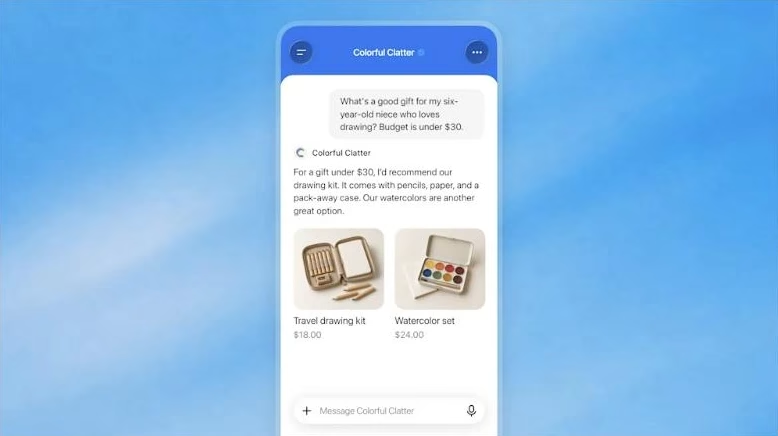
If you sell online from the Valley and your category qualifies, a Business Agent is worth testing. It answers questions about your products and policies with information you provide, in a chat that’s clearly labeled and separate from the customer’s own ChatGPT conversation. You can also promote it with ChatGPT ads. Publishing one is optional; claiming your business and running ads are separate decisions.
OpenAI’s Business Agents Policy sets the rules, and they’re sensible (OpenAI, Nov 10, 2026). The agent has to make clear it’s an AI representing the business. It can’t invent prices, availability, reviews, credentials or guarantees, can’t create false urgency or keep pushing after someone says no, and can’t give advice that legally requires a professional license. OpenAI also reviews the business category and how the agent will be used, so verification alone doesn’t guarantee you’ll be approved for one.
One thing to test before publishing if your customers write in Spanish: OpenAI’s documents don’t say anything about language. Ask your agent the questions your customers actually ask, in English and in Spanish, and read the answers the way a customer would. On the border, that test is part of the job, not an extra.
What I’d Do This Week If I Owned an RGV Business
- Ask ChatGPT about your business the way a customer would, in English and Spanish (“best A/C repair in McAllen,” “¿dónde hay una buena panadería en Edinburg?”). Write down whether you show up and what it says about you.
- Search for your listing in Business Hub and claim it if it’s there, using your business phone or your website’s domain.
- Gather your verification documents before you start Persona, and check that your business name and address match everywhere.
- Fix the basics once you’re verified: website, description, category, logo and policies. Use the same wording as your website and Google Business Profile.
- Make your website the clearest source about your business: hours, services, areas you serve, prices where you can name them. ChatGPT still reads the rest of the web, and your site is the one source you fully control.
- Check your insights after 28 days, next to your ChatGPT visits in Google Analytics.
- Be skeptical of anyone who promises ChatGPT rankings. OpenAI itself says claiming doesn’t guarantee more visibility.
Quick FAQ
Does it cost anything to claim my business in ChatGPT?
OpenAI’s announcement and help doc don’t mention any fee to claim a business, and you don’t need a ChatGPT ads account or an enterprise contract. Advertising and Business Agents are separate, optional steps.
Will claiming my business make ChatGPT recommend it more often?
No. OpenAI says claiming lets you manage the information you provide but doesn’t guarantee increased visibility or give you control over ChatGPT’s independent recommendations. Advertising doesn’t influence those answers either.
Can a local store or restaurant in the RGV claim its business in ChatGPT?
Yes, if ChatGPT already has a U.S. listing for it. Local stores and restaurants can’t add a new listing yet, and Business Agents are only available to eligible U.S. ecommerce and online service businesses at launch.
Will Business Hub show me what customers asked about my business?
No. It shows aggregated mentions, website clicks and discovery topics, which are grouped themes. OpenAI doesn’t share individual prompts, conversations or chats with your Business Agent.
Can my web designer or agency manage my ChatGPT profile?
Yes. The person who claimed the business can add teammates and give an agency access through Business Hub, each using their own ChatGPT account. Keep the claim itself in the owner’s name.
Want Help Getting Your Business Right in ChatGPT?
RGV Web is a web design and SEO practice based in McAllen, TX. We help Valley businesses show up accurately in Google and in AI answers: claiming and cleaning up profiles, making the website the source AI tools trust, and measuring what actually sends customers. See how our SEO and GEO work, start the conversation here, or call (956) 991-6596.
Ready to Dominate Local Search in the RGV?
We build high-performance websites with built-in semantic structure and local entity schemas. Let's make your business the authority in South Texas.

Written by Carlos Guzmán
Carlos Guzmán is the founder of RGV Web — a web designer and SEO specialist with 20+ years of experience helping small businesses in Mexico and the U.S. turn their websites into real business assets, from design and development to SEO, automation, and e-commerce.